5.Don't Run the Red Light
Case Description
At intersections with fewer lanes, the traffic lights may have a button for pedestrians to press. This controls the pedestrian green light to turn on and the vehicle traffic lights to turn red, allowing safe crossing.
Key Knowledge Points
- How to use the Sugar button module
- How to use the Sugar LED module
##Case Implementation
###Structural Assembly Don't Run the Red Light.pdf
###Circuit Connection
- Connect the green LED module to the Robotbit P0 terminal block.
- Connect the red LED module to the Robotbit P1 terminal block.
- Connect the button module to the Robotbit P2 terminal block.
Programming
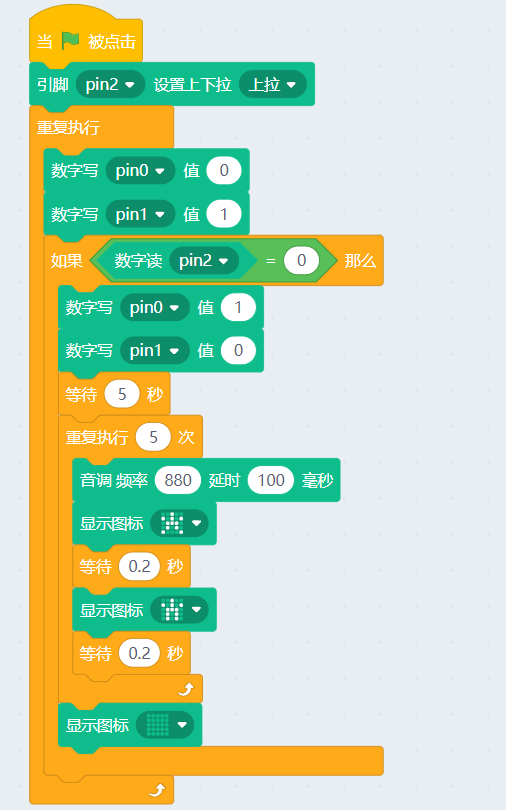
1、By default, the red light is on. Set the digital level value of the red LED connected to the P1 pin to 1, and set the level value of the green LED connected to the P0 pin to 0.
2、When the button is pressed, the red light turns off and the green light turns on. After 5 seconds, the LED matrix blinks, then switches back to the red light.
3、The button is connected to the P2 pin. Before use, the P2 pin needs to be initialized in the program and set to pull-up mode.